

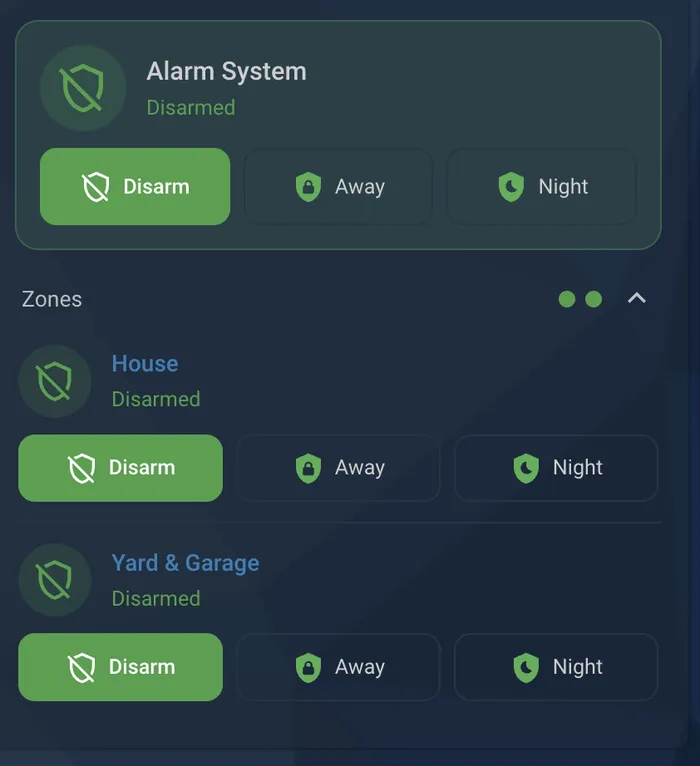
There's no shortage of control cards available for Home Assistant, but I was a bit surprised to discover that very few can control multiple partitions. Partitions are a feature that let you define multiple groups of sensors that you can control independently. They allow for a variety of unique configurations, such as controlling the office space of an industrial building independently from the workshop floor, or the lobby of a multi-tenant building independently of the apartment units.
I use partitions to control my home and the surrounding yard and garage space as two separate areas. Historically I controlled them as what was essentially two separate systems, which meant going through arming and disarming processes twice. Certainly not the most strenuous part of my day, but still an annoyance to say the least. Luckily it is one that I was able address in short order.
The Multi-Partition Alarm Card allows you to control precisely this type of layout with only one set of controls. You can also expand the partition list to control them individually if you wish to or if they become out of sync. This is especially helpful when trying to disarm a partition that you accidentally set the alarm off on!
Installation#
-
Download the code
It's available in my Github repo, in the Home Assistant Goodies section.
-
Copy alarm-partitions-card.js into /config/www/ on your Home Assistant server.
Create the www folder if it doesn't exist, then restart HA once so it serves that folder.
-
Add it as a Resource Entry in Home Assistant
Go to Settings → Dashboards → ⋮ (top right) → Resources → Add resource.
- URL:
/local/alarm-partitions-card.js?v=1 - Type: JavaScript module
- If you don't see Resources, turn on Advanced Mode in your user profile.
- URL:
-
Add it to one of your dashboards
Edit a dashboard, add a Manual card, and paste the following:
YAML type: custom:alarm-partitions-card title: Alarm master_name: Whole system partitions: - entity: alarm_control_panel.house name: House - entity: alarm_control_panel.perimeter name: Perimeter